
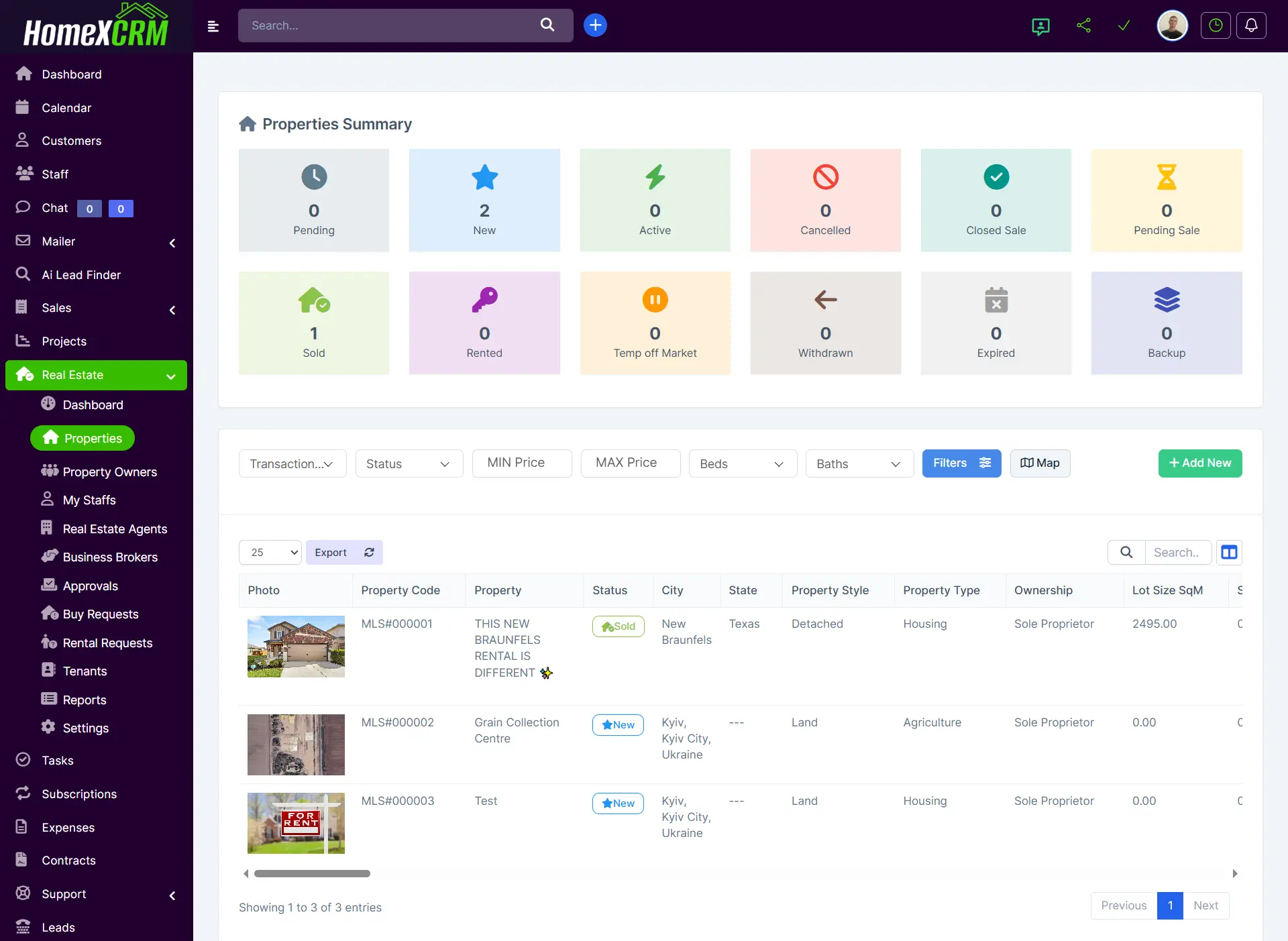
Properties Summary – User Guide
The Properties Summary page provides an overview of all properties in the system, allowing users to track, search, and manage properties efficiently.
1. Overview and Status Filters
At the top of the summary page, you will find property status statistics:
| Status | Description |
|---|---|
| Pending | Properties awaiting approval or verification. |
| New | Recently added properties not yet active on the market. |
| Active | Properties currently available for sale or rent. |
| Cancelled | Properties withdrawn before completion. |
| Closed Sale | Sales that have been completed but not fully processed. |
| Pending Sale | Properties under a sales agreement but not finalized. |
| Sold | Properties successfully sold. |
| Rented | Properties currently rented out. |
| Temp Off Market | Temporarily removed from listing. |
| Withdrawn | Properties permanently removed from listing. |
| Expired | Properties whose listing period has ended. |
| Backup | Backup or secondary listings. |
Users can filter the summary by Sale / Rent and specify a minimum and maximum price to refine the displayed results.
2. Property Table
The main property table provides a detailed overview of all properties. Each row represents a property and includes key information.
Table Columns
| Column | Description |
|---|---|
| Photo | Main image of the property. |
| Property Code | Unique identifier (e.g., MLS#000001). |
| Property Name | Display name or title of the property. |
| Status | Current status of the property (New, Sold, Active, etc.). |
| City / State / Country | Location of the property. |
| Property Style | Architectural style or category. |
| Property Type | Type of property (Housing, Land, Commercial, etc.). |
| Ownership | Ownership type (Sole Proprietor, Joint Owner, etc.). |
| Lot Size (SqM) | Land area. |
| SqM Total | Total area of the property (building). |
| Transaction Type | Sale or Rent. |
| Property Price | Asking price. |
| Reservation Payment | Initial payment, if applicable. |
| Maintenance Fee | Ongoing fees associated with the property. |
| Property Condition | Current condition (New Construction, Completed, etc.). |
| Furnished | Whether property is furnished (Yes / No). |
| Utilities / Appliances / Kitchen / Beds / Baths / Garage | Key interior details. |
| Address / Street / Zone / Zip Code / Area Number | Full address information. |
| Year Built | Construction year. |
| Created By / Date Created | User who added the property and timestamp. |
| Fireplace / Heating / Air Conditioning / Sewer / Water / Electrical / Security | Additional property features. |
| Accessibility Features / Floor / Ceiling / Window Features / School / Landmark | Optional details for convenience and compliance. |
| Latitude / Longitude | GPS coordinates for mapping. |
| Availability Date / SqM Heated / SqM Heated Source / SqM Total Source | Property metrics. |
| Owner Name / Owner Phone | Owner contact information. |
| Gas Emission / Energy Efficiency / Cable / Internet / Commission / Utilities Included | Environmental, technical, and financial details. |
3. Actions
Each property row provides the following actions:
- View – Open detailed property view.
- Edit – Modify property information.
- Delete – Remove the property from the system (with confirmation).
4. Pagination and Search
- Search – Enter keywords, property codes, or owner names to filter the table dynamically.
- Pagination – Navigate between multiple pages if the property list is long. The table shows the number of entries displayed and total entries available.
5. Notes
- Properties are sorted by creation date by default, but users can sort by any column by clicking the column header.
- Filters (status, sale/rent, price range) allow quick identification of properties matching specific criteria.
- All changes made via the Edit action are immediately reflected in the summary table.